Guides / 08
Write notes in a vault
Notes are text files in the vault's Notes folder, encrypted like every other file. There is no Save button.
08Guide
Steps
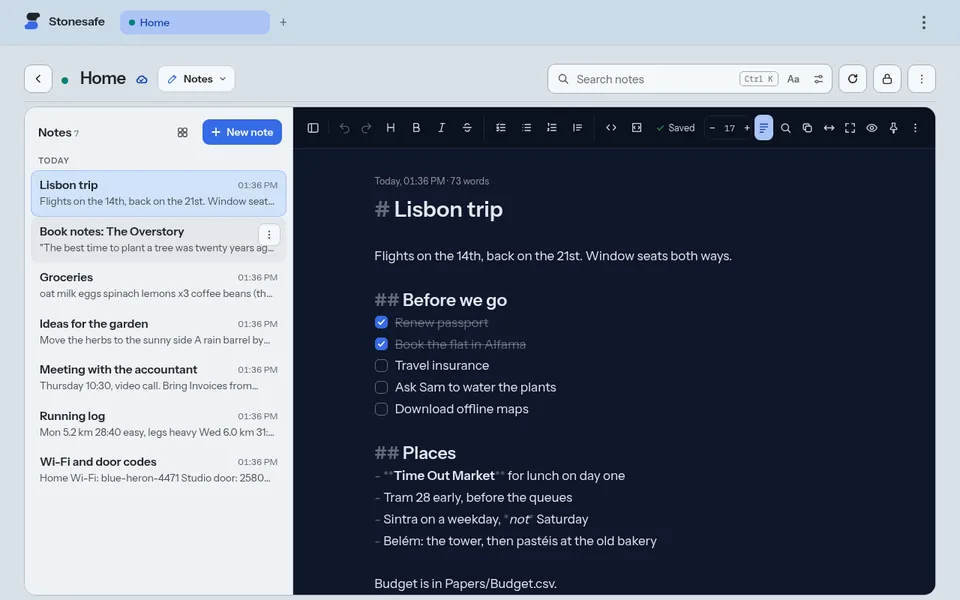
- Open a vault, then pick Notes from the mode menu at the top. The menu shows the mode you are in, such as Files.
- Choose New note.
- Type. The first line becomes the note's title. The note saves a second after you stop.
- For headings, lists and checklists, open the note's menu (⋮) and turn on Markdown. A format bar appears.
- To keep a note on top, choose Pin note in its menu.
Good to know
- A note open on two devices shows the other device's typing a moment later. If both change the same words, both versions stay in the note.
- Notes stay out of Files, so they do not crowd your documents. They are still files: a backup, a download or the trash treats them like any other.
- Search notes looks inside every note, not only the titles.
Next guide: Listen to music and recordings